
Accordion
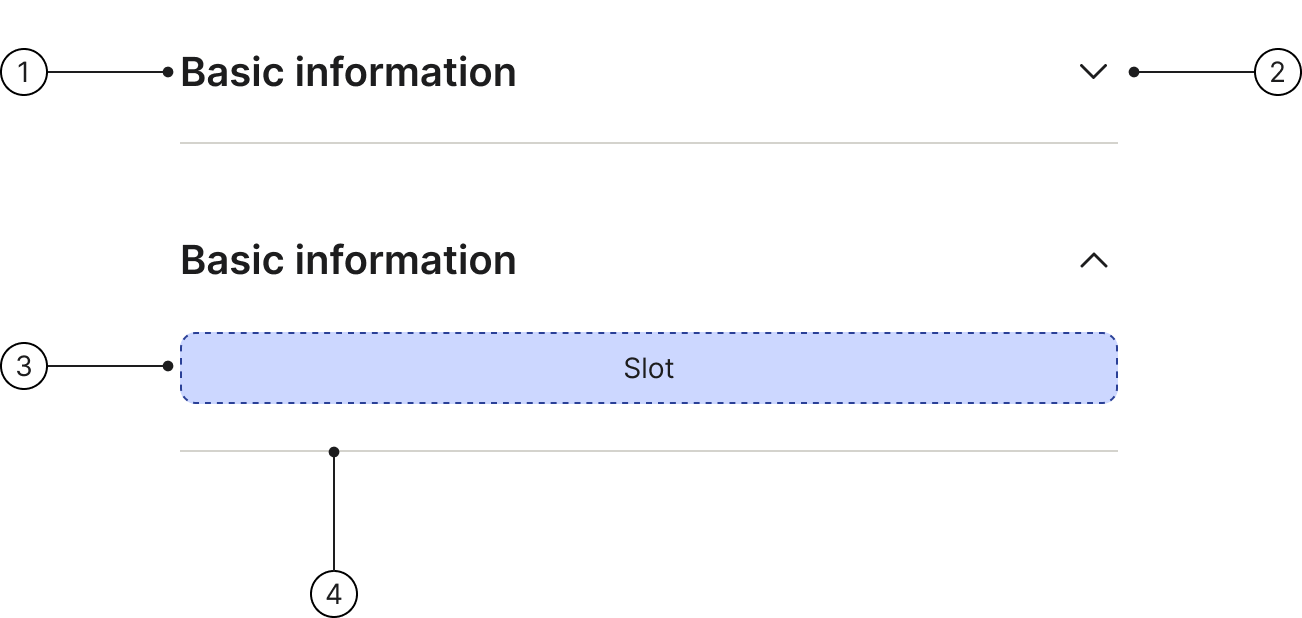
An accordion helps you show and hide content. When you press the icon, it expands to reveal more information or collapses to hide it.
 The guideline content on this page is synced with Figma and can be used as a source of truth.
Open in Figma
The guideline content on this page is synced with Figma and can be used as a source of truth.
Open in Figma
Anatomy
- Title
- Button icon
- Content
- Divider
Title
The title describes the content a row can reveal. Titles can wrap to multiple lines if needed, but it is best to keep them concise.
Basic information
Content
The content area of an accordion row can include text, images, or other components. The accordion height will flex to fit various types of content.
For paragraph text, keep the line length between 40–75 characters (counting both letters and spaces).
Basic information
Morbi tristique a nisl eget vulputate. Sed in lacus a arcu bibendum rhoncus sit amet ut lorem. Mauris pellentesque felis non elementum sodales.
Divider
Dividers are shown between accordion rows to aid visual clarity.
Basic information
Basic information
Accessibility
Keyboard interaction
All components should be reachable via TAB and SHIFT+TAB keys.
Basic information
Behaviour
Expand/Collapse
When using an accordion, you can expand or collapse any given row by clicking on any part of it, including the title or icon button. The icon will change to show whether the row is open or closed. Rows stay open until you close them yourself.
Clickable area
By making the entire field — including the label, icon, and any surrounding space — clickable, you significantly increase the target area for users. This is especially beneficial on touch devices or for users with motor impairments, as it requires less precision to expand or collapse the section.
Hover
When the user hovers on the accordion the background colour will change to surface/hover.
When the user hovers on the accordion in an expanded state the background colour will change to surface/hover. The area in which the background colour changes is the same as in the default state.
Design
Collapsible lists/accordion, without script
Collapsible lists, or accordions, using <details> and <summary> combo.
With new .collapse-list class.
Title
And old .panel-group structure using <details> and <summary> combo.
.panel-group classes are deprecated and will be removed in version 3.0. Use .collapse-list instead.
Title
Collapsible lists/accordion, with script
For this variant component you need JavaScript! We recommend to create your own scripts following the structure from the examples below.
You can also use the scripts we use for our examples.
With new .collapse-list class.
And old .panel-group structure.
.panel-group classes are deprecated and will be removed in version 3.0. Use .collapse-list instead.
Collapsible lists/accordion, with multilevels
With new .collapse-list class, using <details> and <summary> combo.
Dividers (hr.divider) are only supported at the first level — place them as siblings between and after <details> elements inside .group-list.
Title 1
Title 1-1
Title 1-2
Title 1-3
Title 1-4
Title 1-5
Title 2
Title 2-1
Title 2-2
Title 2-3
Title 3
Title 3-1
Title 3-2
Title 3-3
Title 3-4
Title 4
Title 4-1
Title 4-2
With new .collapse-list structure (div's).
Dividers (hr.divider) are only supported at the first level — place them as siblings between and after .collapse-list elements inside .group-list.
For this variant component you need JavaScript! We recommend to create your own scripts following the structure from the examples below.
With old .panel-group structure, using <details> and <summary> combo.
.panel-group classes are deprecated and will be removed in version 3.0. Use .collapse-list instead.
First Group Title
Item 1.1
Article / Content Title
Sed aliquet ipsum sed augue porta lacinia. Morbi at iaculis enim. Morbi dictum magna in nulla euismod, sit amet condimentum quam lacinia.
Item 1.2
Article / Content Title
Sed aliquet ipsum sed augue porta lacinia. Morbi at iaculis enim. Morbi dictum magna in nulla euismod, sit amet condimentum quam lacinia.
Item 1.3
Article / Content Title
Sed aliquet ipsum sed augue porta lacinia. Morbi at iaculis enim. Morbi dictum magna in nulla euismod, sit amet condimentum quam lacinia.
Second Group Title
Item 2.1
Article / Content Title
Sed aliquet ipsum sed augue porta lacinia. Morbi at iaculis enim. Morbi dictum magna in nulla euismod, sit amet condimentum quam lacinia.
Item 2.2
Article / Content Title
Sed aliquet ipsum sed augue porta lacinia. Morbi at iaculis enim. Morbi dictum magna in nulla euismod, sit amet condimentum quam lacinia.
Item 2.3
Article / Content Title
Sed aliquet ipsum sed augue porta lacinia. Morbi at iaculis enim. Morbi dictum magna in nulla euismod, sit amet condimentum quam lacinia.
Third Group Title
Item 2.1
Article / Content Title
Sed aliquet ipsum sed augue porta lacinia. Morbi at iaculis enim. Morbi dictum magna in nulla euismod, sit amet condimentum quam lacinia.
Item 2.2
Article / Content Title
Sed aliquet ipsum sed augue porta lacinia. Morbi at iaculis enim. Morbi dictum magna in nulla euismod, sit amet condimentum quam lacinia.
Item 2.3
Article / Content Title
Sed aliquet ipsum sed augue porta lacinia. Morbi at iaculis enim. Morbi dictum magna in nulla euismod, sit amet condimentum quam lacinia.
With old .panel-group and old structure.
.panel-group classes are deprecated and will be removed in version 3.0. Use .collapse-list instead.
For this variant component you need JavaScript! We recommend to create your own scripts following the structure from the examples below.
You can also use the scripts we use for our examples. For this case - collapsible lists - you need to use collapsible-list.js